Everysk Excel Add-In Instructions
The Everysk for Excel add-in is designed to enable Everysk users to turn their excel workbooks into interactive Everysk interfaces. Using custom functions, users can create, retrieve, update and delete datastores. Additionally, users can kick off workflows using the contents of cells as inputs and receive the workflow output the moment it's ready.
This enables users to update and trigger their investment workflows from Excel. For example, traders at a hedge fund could save a trade order to the system for what-if analysis. Risk managers could update risk limits for their funds. Compliance officers could trigger a workflow that checks portfolios against preconfigured investment guidelines and emails a report to stakeholders.
Installation
Follow the steps below:
- In Excel, go to the Home tab and click on Add-ins.
- Search for "Everysk for Excel" and click Add.
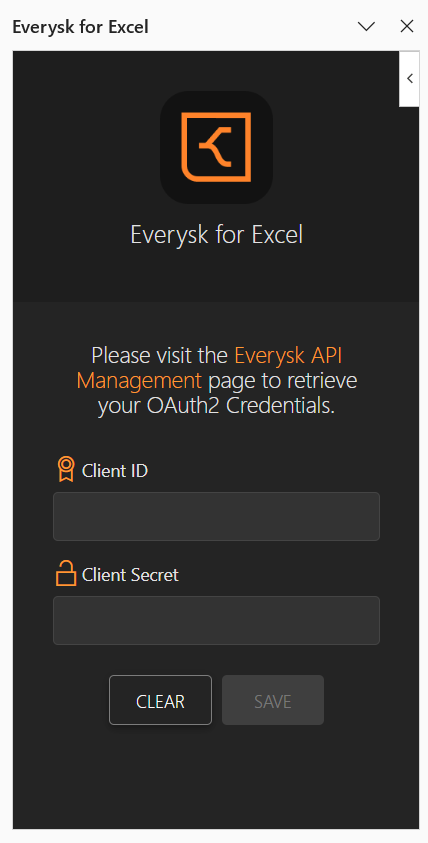
- You will be prompted to enter your Everysk Account Client ID and Secret.
- To generate the Client ID and Secret, users should enter their username and password on the Everysk web app.
Functions
Datastore Create
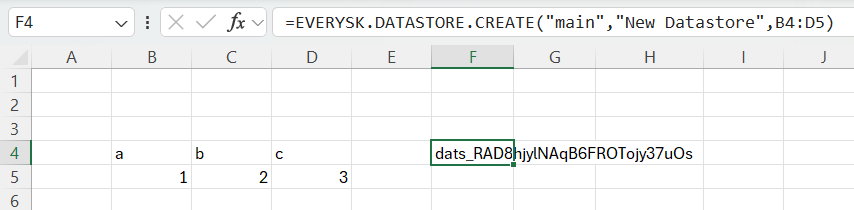
=EVERYSK.DATASTORE.CREATE(workspace,name,data,[date],[description],[tags])
Creates a datastore with the given parameters and returns the ID of the created datastore.
Parameters
| Parameter | Description | Required |
|---|---|---|
workspace |
Name of the workspace where the datastore will be created. This must match an existing workspace in Everysk. | Yes |
name |
Name assigned to the datastore. | Yes |
data |
Table containing the data to be used. | Yes |
date |
Reference date for the datastore formatted as YYYYMMDD. | No |
description |
Detailed description of the datastore. | No |
tags |
Keywords to help identify and categorize the datastore. | No |
Example
Datastore Update
=EVERYSK.DATASTORE.UPDATE(workspace,id,name,data,[description],[tags])
Updates a datastore with the parameters given the Datastore ID.
Parameters
| Parameter | Description | Required |
|---|---|---|
workspace |
Name of the workspace where the datastore will be updated. | Yes |
id |
ID of the datastore to be updated. This must match an existing datastore in Everysk. | Yes |
name |
New name assigned to the datastore. | Yes |
data |
Table containing the data to be used. | Yes |
description |
Detailed description of the datastore. | No |
tags |
Keywords to help identify and categorize the datastore. | No |
Example
=EVERYSK.DATASTORE.UPDATE("main","dats_R5k57xZEyQZ4zwNCcJXs5MAYT","Test",B4:D5)
dats_R5k57xZEyQZ4zwNCcJXs5MAYT

Datastore Retrieve
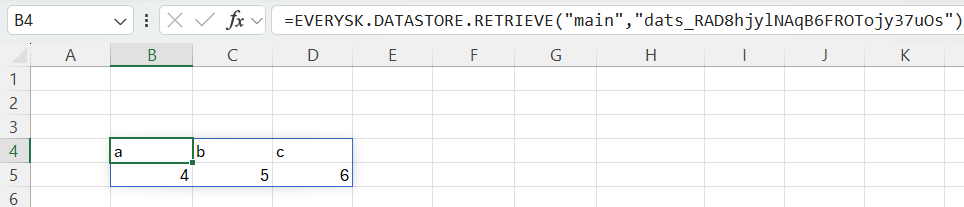
=EVERYSK.DATASTORE.RETRIEVE(workspace,id)
Retrieves the Datastore content with the given Datastore ID.
Parameters
| Parameter | Description | Required |
|---|---|---|
workspace |
Name of the workspace where the datastore will be retrieved. | Yes |
id |
ID of the datastore to be retrieved. | Yes |
Example
Returns the data stored within the datastore.
Datastore Delete
=EVERYSK.DATASTORE.DELETE(workspace,id)
Deletes a datastore with the given Datastore ID.
Parameters
| Parameter | Description | Required |
|---|---|---|
workspace |
Name of the workspace where the datastore will be deleted. | Yes |
id |
ID of the datastore to be deleted. | Yes |
Example
For testing purposes, use the datastore ID of a datastore created by EVERYSK.DATASTORE.CREATE. Returns TRUE for a successful deletion or #N/A for an unsuccessful one.

Workflow Run
=EVERYSK.WORKFLOW.RUN(workspace,workflow,[output_parameter],[parameterKeyValuePairUnit],...)
Executes a workflow with the given parameters and watches for given output data.
Parameters
| Parameter | Description | Required |
|---|---|---|
workspace |
Name of the workspace where the workflow is located. | Yes |
workflow |
ID of the workflow to be executed. | Yes |
output_parameter |
Name of the output variable. | No |
parameterKeyValuePairUnit |
Key-value pair of the parameters. | No |
Example
Returns the output of the workflow. This can be a number, string, or table. Returns 0 if the workflow has no defined output.

Workflow Run Async
=EVERYSK.WORKFLOW.RUN.ASYNC(workspace,workflow,[parameterKeyValuePairUnit],...)
Triggers a workflow with the given parameters without waiting for it to finish or retrieving the results.
Parameters
| Parameter | Description | Required |
|---|---|---|
workspace |
Name of the workspace where the workflow is located. | Yes |
workflow |
ID of the workflow to be executed. | Yes |
parameterKeyValuePairUnit |
Key-value pair of the parameters. | No |
Example
