Report Distribution
The Report Distribution worker can send a generated report to selected recipients through email. Multiple reports might be selected to be distributed. Those reports can be configured to have a limit in which it will be available to be visualized.
Parameters
The Report Distribution worker must receive specific parameters in order to execute properly. When parameters are not set correctly it may cause the worker to not work as expected. This worker's parameters are separated in the following tabs: Input and Email Settings.
Input
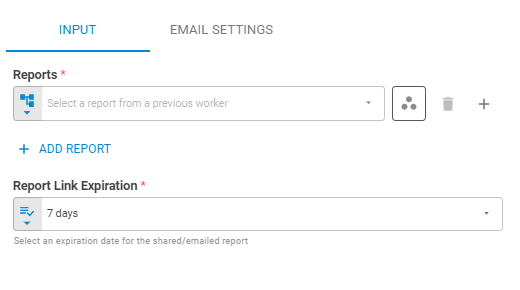
The Input tab contains parameters which are consumed by the worker, in order to execute its calculations or actions.
Report
Select the reports to be sent using Fixed Report, Tag Latest, Tag List or Upstream Data variants. You can add more reports by clicking on the Add Reportbutton.

Workspace
Set the research workspace of the report using Fixed Workspace variant.
Report Link Expiration
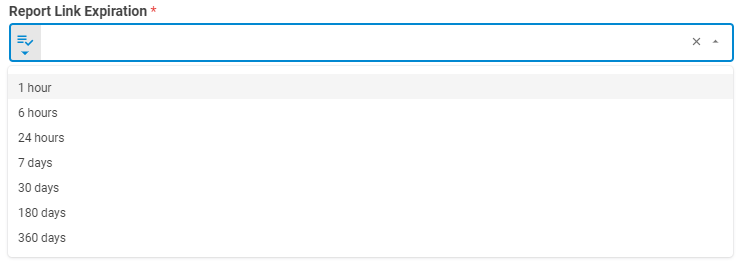
Set the expiration limit for the distributed report. The limit options are: 1 hour, 6 hours, 24 hours, 7 days, 30 days, 180 days and 360 days.
Email Settings
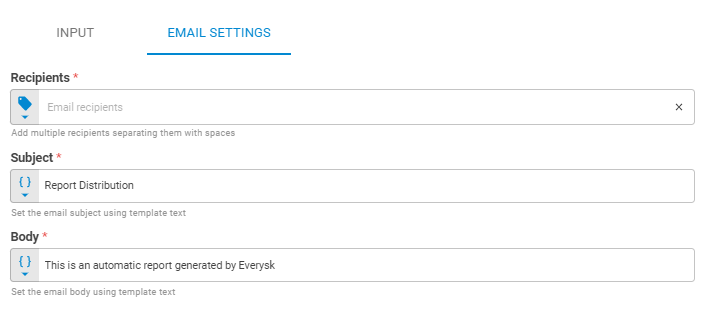
The Email Settings tab contains parameters that define the configuration of the email that will be sent.
Recipients
Set email recipients using Tag or Upstream Data variants.
Subject
Set the email's subject to be sent to the recipients using Template Text or Upstream Data variants.
Body
Set the email's body to be sent to the recipients using Template Text or Upstream Data variants.
Results
No results are returned to the workflow.