Custom Index Generator
The Custom Index Generator worker creates a new custom index in the Everysk format with user supplied parameters. You can either save the generated custom index in the platform to be used in the workflow or use it temporarily in the workflow where it was generated, to be passed to other workers that consume a custom index.
Parameters
The Custom Index Generator worker must receive specific parameters in order to execute properly.
Custom Index
The custom index field has two types of operations controlled by an expand icon (highlighted below in red):
Not Expanded
It is used when the various parameters from the custom index (symbol, name, currency, periodicity, data type, base price) are being provided by the Everysk API, as a Custom Index object. It will be necessary to pass the whole custom index to a Custom Index Generator worker as Upstream Data in order to save it in the Everysk Platform. You can check the The Worker Structure article to learn more about how to use data from the API inside a workflow.


Expanded (Default)
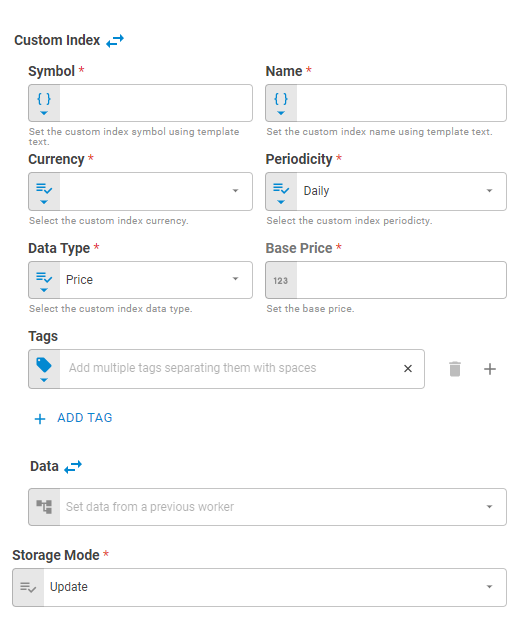
When you need to supply all the elements from a custom index, one by one, you will need to press the Expand icon to open more input fields. Fields for the portfolio's symbol, name, currency, periodicity, data type, base price, data and tagswill be exposed:
Symbol
Set the custom index symbol using Template Text or Upstream Data variants.
Name
Set the custom index name using Template Text or Upstream Data variants.
Currency
Select the custom index currency using Fixed Value or Upstream Data variants.
Periodicity
Select the custom index periodicity using Fixed Value, Fixed Periodicity variants. The periodicity can be daily, weekly, monthly.
Data Type
Select the custom index data type using Fixed Value, Fixed Periodicity variants. The data type can be Price, Return(Decimal), Return(Percentual).
Base Price
Set the custom index base price using Fixed Number or Upstream Data variants. The base price is only allowed to be set when the Data Type is Return(Decimal) or Return(Percentual).
Tags
Set the custom index tags using Fixed Tags or Upstream Data variants.
Data
The data field has two types of operations controlled by a expand button as well: not expanded and expanded. Not Expanded is used when the data has already been defined elsewhere (a file, a datastore, etc) and Expanded exposes fields to enter data information, one by one.
Not Expanded
Similar to the custom index functionality, Data can be passed to this worker as lists. This list of data can be previously specified in a File or Datastore for example.
In the Not Expanded format (default), only a single field is available to specify the custom index data:

Expanded
By clicking in the Expand icon, more fields are exposed, enabling users to enter custom index data one by one.
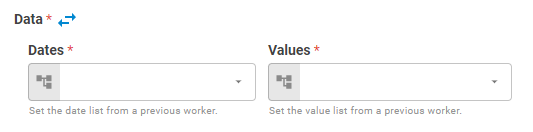
Here you can add lists of Dates and lists of Values which will compose the custom index data.
Storage Mode
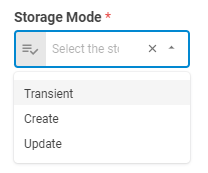
When generating the new custom index, you can choose whether this custom index will be saved in the platform or not through the Storage Mode button. This button has two options: Transient, Create andUpdate
Result
Once the worker finishes its executions successfully, it will return a result object containing the retrieved datastore(s) to the workflow, which can be used by downstream workers. Below you can see an example of the Custom Index Generator's result object hierarchy. You can check the Output Types article to learn more about result objects types.
- Custom Index (custom index)
- Symbol (string)
- Name (string)
- Base Price (number)
- Currency (string)
- Periodicity (string)
- Tags (list)
- Data Type (string)
- Data (list of lists)