Fees Inserter
The Fee Inserter worker is responsible for processing and entering costs and provisions of funds. It receives a file, and insert the fee into its respective destination portfolio. This worker has two different ways to process the fees: Choosing the Insertion Mode field (view item 1.1) you select the way in which the worker will process the information of the incoming fees. In the Target Portfolio operating mode, all fees are inserted into a single Portfolio which is selected in the Portfolio (view item 1.2) field, if the option selected is Set By Portfolio UID, the Portfolio UID information in each of the fees individually is mandatory, this one is responsible for identifying the target portfolios in which the fees will be inserted. The Fee Inserter worker generates two outputs: a datastore with the fees information for each day and the resulting portfolio, after adding the fees.
Parameters
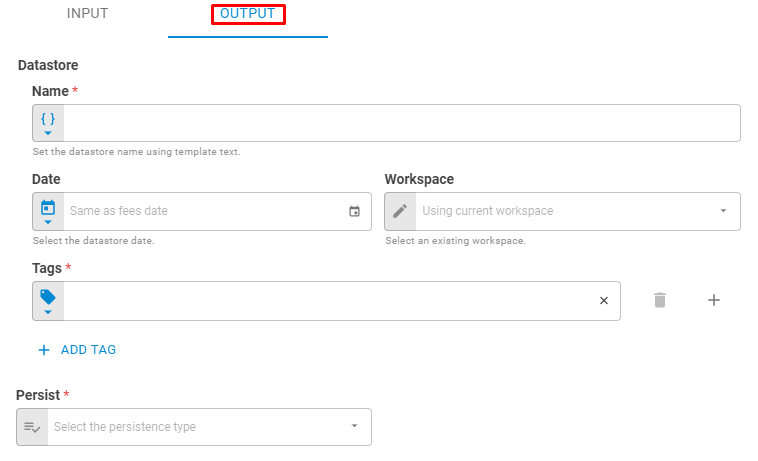
The Fee Inserter worker must receive specific parameters in order to execute properly. When parameters are not set correctly it may cause the worker to not work as expected. This worker's parameters are separated in the following tabs: Input and Output.
Input
The Input tab contains parameters which are consumed by the worker, in order to execute its calculations or actions.
Insertion Mode
The Insertion method field defines the processing search method when looking for the portfolios that fees will be inserted. If the option "Target Portfolio" is chosen, it is necessary to assign a specific portfolio in which the fees will be inserted. In the "Set by Portfolio UID" option, it is mandatory to send the Portfolio UID information for each fee, which identifies the respective destination portfolio.
Portfolio
Set the target portfolio using Fixed Portfolio, Get Latest or Upstream Data variants. Only necessary in the Target Portfolio Insertion Mode.
File
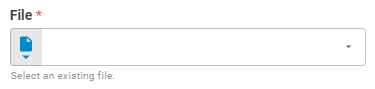
The File field receives the data of fees and costs carried out in the portfolio. These information must be properly structured in a .csv file extension. Set File using Upstream File, Fixed File or Get Latest variants.
The Fee Inserter file is a Comma-Separated Values (csv) extension, the header must contain the following fields: Code, Quantity, and Portfolio UID (if the Insertion Mode is Set By Portfolio UID) information. The codes that represent each of the costs available by the system can be found in Supported Fees. If additional information related to the fee is sent, such as trader, settlement, or dealer, the worker automatically adds these columns to the datastore data. Each row corresponds to a Fee or Cost. The table below shows an example of filling.
| Code | Quantity | Portfolio UID |
|---|---|---|
| 36 | -150000 | 00000000000000 |
Workspace
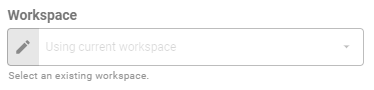
The so-called fields set the research workspace of the Portfolio (1.2) and File (1.3). Set workspace using Fixed Workspace variant.
Output
The Output tab contains parameters that defines the worker execution results, and how it will be provided to downstream workers.
Name
Set the output datastore name using Template Text or Upstream Datavariants.
Date
Select the output datastore date using Fixed Date or Upstream Data variants. By default, the created datastore have the same date of the fees.
Workspace
Set the workspace in which the datastore will be saved on the platform.
Tags
Set the datastore tags using Fixed Tags or Upstream Data variants.
Persist
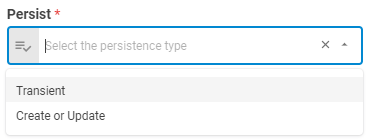
Select if the result datastore will be saved on the platform, update an existing portfolio or be a transient one through the following options: Transient or Create or Update.
Results
The result of the Fees Inserter worker will vary depending on the Insertion Mode field (view item 1.1) selected option. If the option of the Insertion Mode field is selected as Target Portfolio, the output will be a Portfolio and a Datastore Objects, however, if the option is Set by Portfolio UID, the output will be a List of Objects containing each Portfolio and the Datastore. Below you can see an example of the Fees Inserter result object hierarchy for each Insertion Mode option. You can check the Output Types article to learn more about result objects types.
Insertion Mode is set as Target Portfolio:
- Object (Object)
- Portfolio (portfolio)
- ID (string)
- Name (string)
- Tags (list)
- Date (date)
- Base Currency (number)
- NLV (number)
- Securities (list)
- ID (string)
- Status (string)
- Instrument Class (string)
- Symbol (string)
- Label (string)
- Quantity (number)
- Datastore (datastore)
- ID (string)
- Name (string)
- Date (date)
- Tags (list)
- Data (list)
Insertion Mode is set as Set By Portfolio UID:
- List (list of objects)
- Object (Object)
- Portfolio (portfolio)
- ID (string)
- Name (string)
- Tags (list)
- Date (date)
- Base Currency (number)
- NLV (number)
- Securities (list)
- ID (string)
- Status (string)
- Instrument Class (string)
- Symbol (string)
- Label (string)
- Quantity (number)
- Datastore (datastore)
- ID (string)
- Name (string)
- Date (date)
- Tags (list)
- Data (list)
Data
The data in the datastore is a table, in which has the at least the following columns: Fee, Quantity, Execution Date, Settlement, Trader, Dealer, Book, Portfolio UID. Each row corresponds to a fee.